![nursing.com heart logo-no gradient (2).png]](https://help.nursing.com/hs-fs/hubfs/nursing.com%20heart%20logo-no%20gradient%20(2).png?height=40&name=nursing.com%20heart%20logo-no%20gradient%20(2).png)

How To:
- Click on the NPQ tab at the bottom of your screen
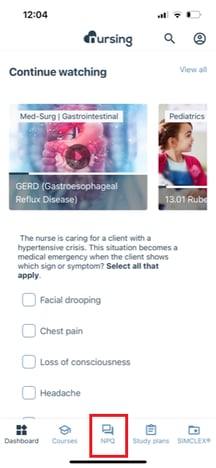
- Quiz Type: Select from our Pre-Nursing question bank or our Student/NCLEX Prep question bank
- Quiz Length: How many questions would you like to take today?
- Nursing Categories: What kind of questions would you like to quiz over?
- ⭐ TIP ⭐: You can select specific categories or just select them all
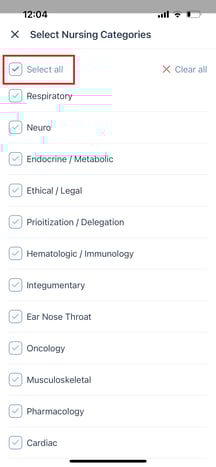
- ⭐ TIP ⭐: You can select specific categories or just select them all
- NCLEX Categories: Which NCLEX Categories would you like to quiz over?
- Question Type: What types of questions do you want to get practice on?
- Question Difficulty: Easy, Medium, or Hard?
- Question Mode: Do you want another shot on the questions you've gotten incorrect?
- Click Start Quiz! 🙌
Help Us Improve